Showing posts with label blogger. Show all posts

Wednesday, November 4, 2009

How to align images in blogger


  • At first, two images are not aligned like this


  • Open the "Edit Html" tab, you will see this


  • Change the value of right margin from 10px to 1000px


  • Public your post and review the result.


Monday, October 19, 2009

How to resize the edit text box in Google blogger

The google blogger provider a great tool to post your blog to internet. But it has a rather small text area for editing.
I found out a way to customize this text box. What you need is a Chrome Browser.
1. Login to your blogger account.
2. Choose to create a new post or editing an exist post.
3. Right-click on the free area as image below, choose Inspect element
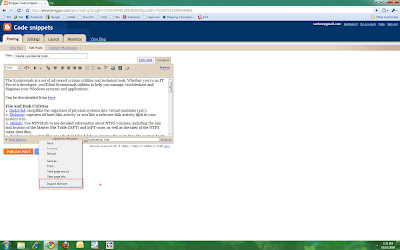


4. A new windows will be displayed soon. Now, you can edit the size property of the windows. Can look at the image below for easily imagination.


Posted by Picasa

Thursday, July 9, 2009

Want to insert html code into blogger

1. Go here: http://www.reconn.us/component/option,com_wrapper/Itemid,62/
2. Uncheck 2 check-boxes and paste your html code in
3. Copy result and paste into blogger windows (tab Edit Html).
4. Click review to see the result.